How to Export Your Card Collection
Download your Ludex card collection as a CSV file instantly from Collection Web Management. Available to Standard and Pro members.
Written By Ross Henke
Last updated 6 days ago
Collection Web Management is currently in Beta. Features and availability may change as we continue to improve the experience.
You can download your entire Ludex card collection as a CSV file directly from Collection Web Management. This is useful for personal record keeping, tracking your collection in a spreadsheet, or keeping a backup of your collection data.
Who Can Export Their Collection
Collection export is available to Standard and Pro members, since it’s part of Collection Web Management. If you’re on the Free plan or Lite, you’ll need to upgrade to Standard or Pro to export your collection.
How to Export Your Collection
Go to collections.ludex.com and sign in to your Ludex account.
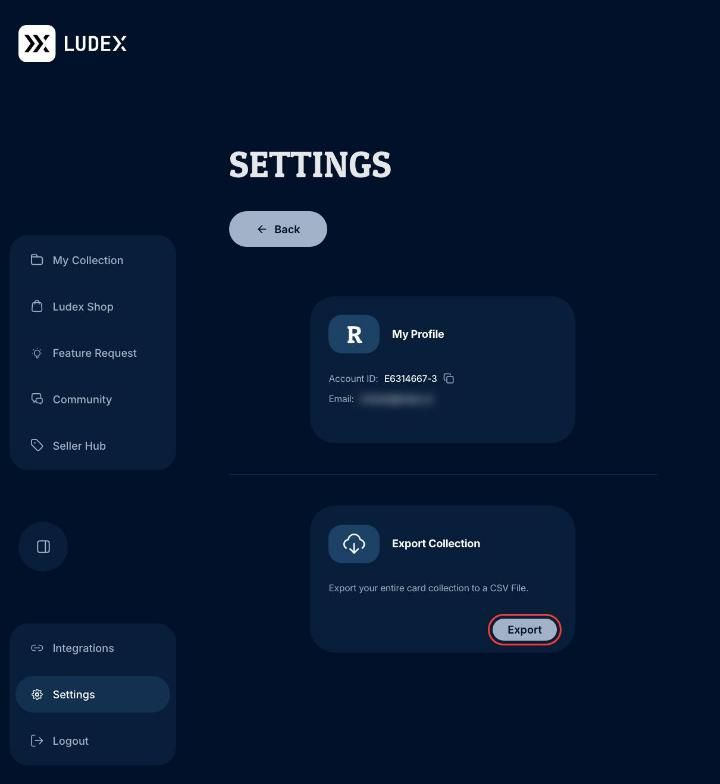
Click Settings at the bottom of the left sidebar.
Under Export Collection, click Export.
Your collection downloads to your computer as a CSV file.
Important Notes
Your export is ready instantly. You don’t need to contact support or wait for an email.
There’s no limit on how often you can export your collection.
Card images are not included. The CSV contains card details only.
The export reflects your collection at the moment you click Export. If you add or edit cards afterward, export again for an up-to-date file.
Related Articles
Need Help?
If you have any questions or run into any issues, please contact our support team at support@ludex.com and we will be happy to assist.
Was this helpful?
Still need help? Ask the team