Understanding the Latest Price Updates Widget
Written By April @ Ludex
Last updated 5 months ago
The Latest Price Updates widget on the Ludex home screen shows the most recent Ludex Estimate changes for cards in your collection. It updates once per day based on the latest eBay sales data, so you always have a current view of how your collection is moving.
Where to Find It
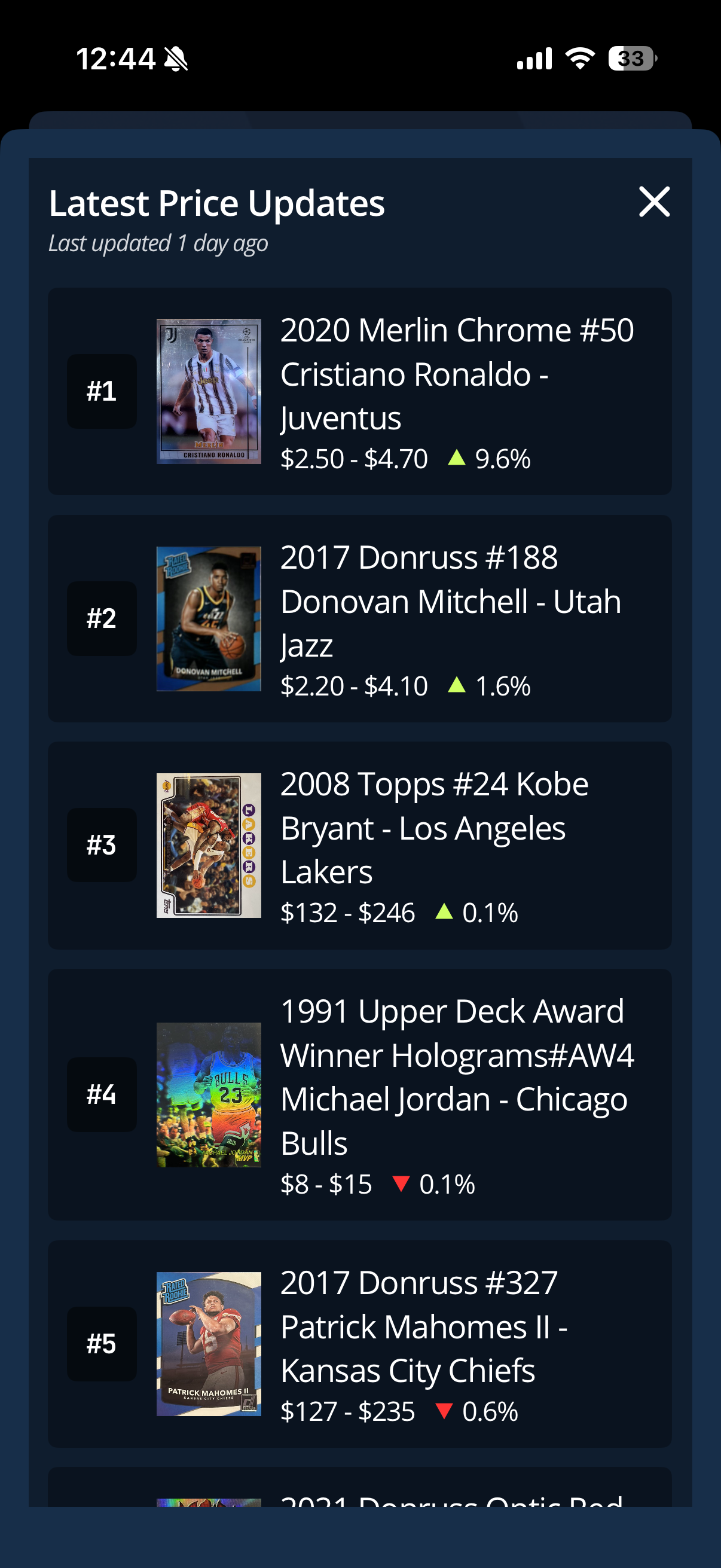
The Latest Price Updates widget is located on the Ludex home screen. It displays your most recently updated cards ranked in order, along with their current Ludex Estimate range and the percentage change since the last recorded sale.
Reading the Widget
Each card in the widget displays the following information:
Card name, year, and set - identifies the specific card
Ludex Estimate range - the current low and high estimated value for that card
Price change indicator - a green upward arrow indicates the value has increased, a red downward arrow indicates the value has decreased, along with the percentage change
How To Use It
From the home screen, tap the Latest Price Updates widget to expand it.
Scroll through the list to view all recently updated cards in your collection.
Tap any card in the list to open its detail page directly within your collection.
Important Notes
The widget displays cards from your personal collection only - it does not show platform-wide price changes.
Prices are updated once per day based on the most recent eBay sales data for each card.
The percentage shown reflects the change in the Ludex Estimate since the last recorded sale for that card.
Tap the expand icon in the top-right corner of the widget to view the full list.
Related Articles
Need Help?
If you have any questions or run into any issues, please contact our support team at support@ludex.com and we will be happy to assist.
Was this helpful?
Still need help? Ask the team