Understanding the CWM Dashboard
Written By Ross Henke
Last updated 5 months ago
Collection Web Management is currently in Beta. Features and availability may change as we continue to improve the experience.
This article explains the header stats bar at the top of the Collection Web Management dashboard, including what your cards count and total collection value mean and how they are calculated.
The Collection Web Management Dashboard Header
When you sign in to collections.ludex.com, the header at the top of the page displays a quick summary of your collection. It includes the following elements:
Cards count - the total number of cards currently saved in your Ludex collection
Value - the total estimated dollar value of your collection based on Ludex Estimates
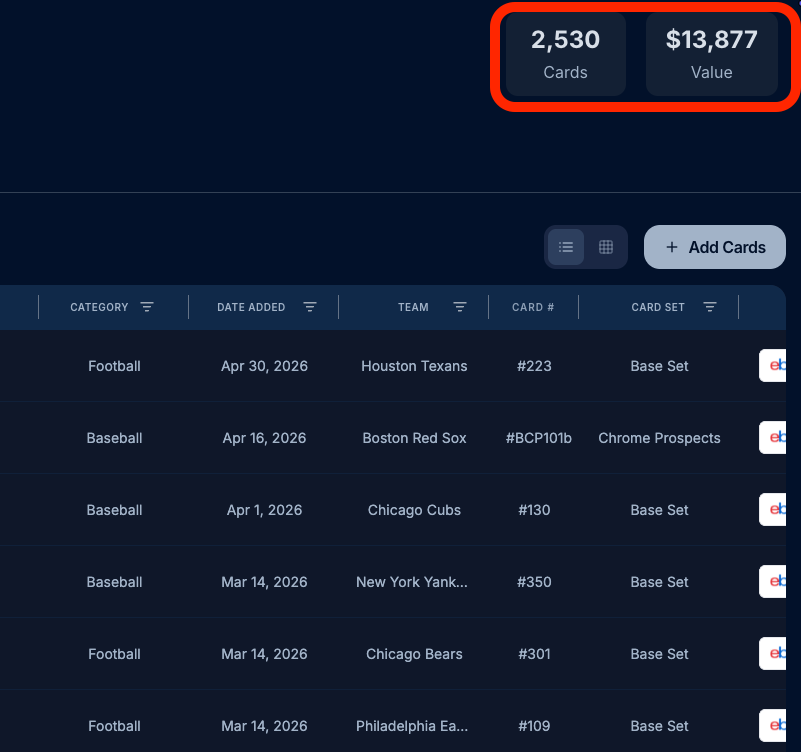
Your Cards Count
The cards count reflects the total number of individual card entries saved in your Ludex collection. This number updates automatically whenever you add or remove cards using the Ludex mobile app.
If you own multiple copies of the same card, each copy is counted based on the quantity set for that card entry. For example, if you have a quantity of 3 set for one card, it contributes 3 to your total cards count.
Your Total Collection Value
The Value figure shown in the header is the sum of all Ludex Estimates across every card in your collection. A Ludex Estimate is the AI-generated value range Ludex assigns to a card based on recent market data.
The total value displayed uses the midpoint of each card's Ludex Estimate range and multiplies it by the quantity of that card in your collection.
How Collection Value Updates
Your total collection value updates automatically as Ludex Estimates are refreshed with new market data. You do not need to take any action to trigger an update. Because card values fluctuate with the market, the figure shown in the header may change from day to day.
The Early Beta Badge
The Early Beta badge next to the COLLECTION title indicates that Collection Web Management is still in active development. During this period, features and data displays may change as the platform is improved. If you notice anything unexpected, please reach out to the Ludex support team.
Important Notes
The total collection value is based on Ludex Estimates and is not a guaranteed market price. Actual sale prices may vary.
Cards added via the Ludex mobile app sync automatically and will appear in your count and value on the web platform.
Cards can only be added to your collection through the Ludex mobile app. Web-based card entry is not yet available.
If your cards count or value appears incorrect, allow a few minutes for your collection to finish syncing, then refresh the page.
Related Articles
Overview of Ludex Collection Web Management: What It Is and How It Works
How To Navigate the Collection Web Management Sidebar and User Menu
Understanding All 22 Collection Web Management Columns: Full Column Glossary
How To Access Collection Web Management on Web vs. Mobile: Feature Comparison
Need Help?
If you have any questions or run into any issues, please contact our support team at support@ludex.com and we will be happy to assist.
Was this helpful?
Still need help? Ask the team